

Updated August 18, 2026
What is the best expense sharing app for travel? Search online forums and reviews dated before 2024, and Splitwise was the clear favourite. However, the once-reigning champion of cost-sharing apps has waned in popularity with recent monetisation changes. Intrusive advertisements, the introduction of a daily limit of three free expense entries, and an annual subscription of $39.99 have forced users to search for alternatives.
Features of the best expense sharing app for travel
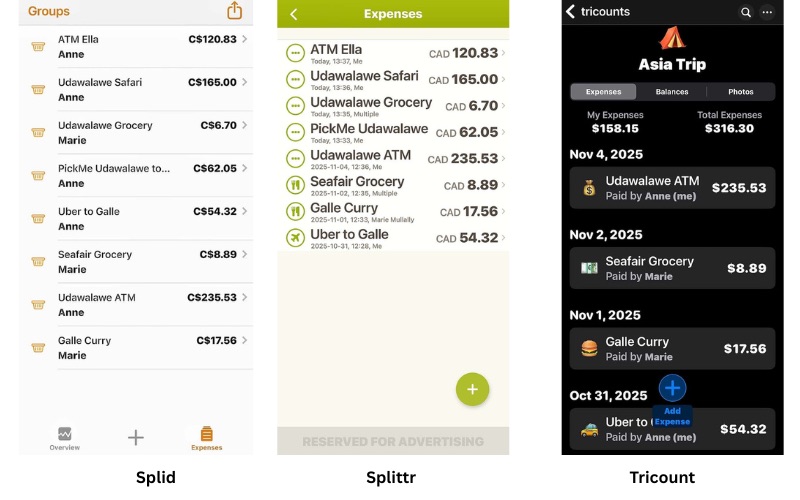
As a result of my experience with Splitwise, Splittr, Splid, and Tricount, I’ve developed an appreciation for the following features in an expense-sharing app for travel costs.
- Basic features are free. A one-time affordable fee to remove advertisements and unleash additional features may be acceptable. A monthly or annual subscription doesn’t align with the needs of most travellers who take infrequent trips and only occasionally need a cost-sharing app.
- It offers a simple, functional way to enter expenses so the app can quickly calculate who owes what amount to whom.
- Adding an expense during group trips needs to be quick and efficient, with just a few taps (preferably before leaving the store or ATM). The ability to do so ensures no expense is overlooked or forgotten. Enter the expense (for what and how much), tap who paid, and tap who is sharing (or not sharing) the expense. For travellers on the move, this feature is critical.
- There’s no limit on the number of expenses that can be added.
- The user interface is intuitive and uncluttered, with no advertisements or unnecessary features that delay posting an expense or interfere with the user experience.
- It works offline, without internet access.
- Not everyone within a cost-sharing group needs to download the app.
- It supports multiple currencies for international travel.
- It’s possible to share a summary of expenses with group members (and a request to settle up) from within the app.
What are alternatives to Splitwise?
Splid, Splittr, and Tricount share similar features.
- All members of a cost-sharing group don’t need to download the Splid, Splittr, or Tricount apps. Participants can be added to a group and settle their balances without creating an account or paying for in-app purchases where they exist.
- All three apps support multiple currencies and have offline functionality.
- All allow for expenses to be categorised (e.g., groceries, transportation, restaurants). Tricount has accompanying icons and the ability to create customised categories.
- All allow for dates to be added; Splittr includes the time the expense is recorded.
Costs of Splid, Splittr, and Tricount
Splid Plus has a one-time fee of $4.99 (CAD) or USD 3.69 to create an unlimited number of groups and the ability to export to Excel. Splid allows you to log expenses in one group for free, and you’re free to keep deleting or editing that group for free. However, creating two groups costs a one-time fee of CAD 3.99 (USD 2.89).
Splittr has intrusive advertisements that interfere with the user experience and the ability to add an expense quickly. These can be removed with a subscription or a one-time in-app purchase. Splittr offers a monthly fee of 99 cents, an annual fee of $4.99, or a lifetime fee of $14.99 to remove ads and provide access to enhanced features.
Tricount no longer has in-app purchases. All core features are now available at no cost.
My experience and needs when using an expense-sharing app
From my experience using Splid, Splittr, Splitwise, and Tricount on several group trips, I’ve realised that the following features are appreciated.
1. Currency conversion isn’t a priority
In cash-based economies where ‘cash is king,’ I travel with a Wealthsimple Prepaid Mastercard with no foreign exchange (FX) fees and ATM fee reimbursement. Even in ‘cashless’ economies, some cash is inevitably needed to access public toilets, pay for ‘free’ (tip-based) walking tours, tip street performers, and buy from market vendors or cash-only establishments.
At every ATM, choosing the option to be charged in the local currency and declining the marked-up Dynamic Currency Conversion (DCC) rate (of the home currency) saves a considerable amount on conversion rates and fees. When I leave the conversion to my card issuer (typically, less than 0.005% on my Wealthsimple withdrawals), I receive a transaction receipt showing the conversion rate and what I was charged in my home currency (Canadian Dollars), which can be added to the cost-sharing app immediately.
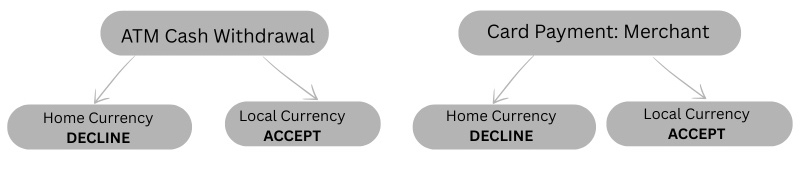
The same applies to credit cards. Where credit cards are accepted, that is my payment method of choice. My no-FX-fee credit card is a Visa so conversion is at the standard Visa exchange rate which is generally very close to the market ‘spot rate’ influenced by daily fluctuations. Plus the credit card earns travel points redeemable for travel expenses.
In Portugal in early 2026, many terminals offered an easy option to decline Dynamic Currency Conversion and pay in the local currency. It involved two steps to press ‘2’ to choose and confirm payment in the local currency (euros).
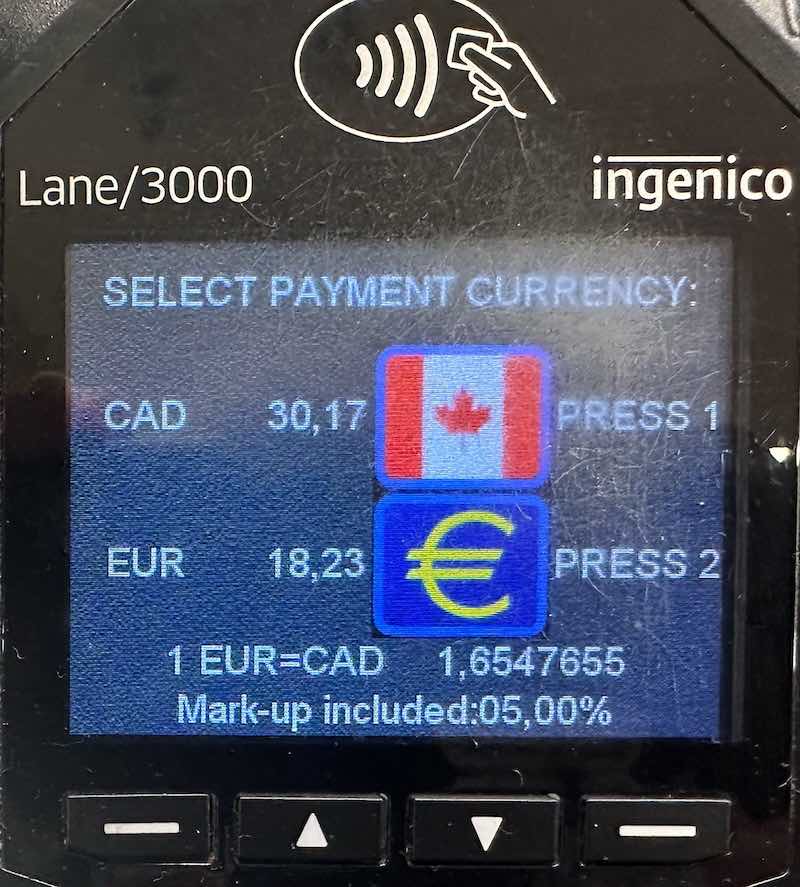
However, declining Dynamic Currency Conversion isn’t always straightforward. Standalone ‘tourist’ ATMs often choose ambiguous language designed to confuse the user. The option to decline Dynamic Currency Conversion is typically asked twice. Always choose “continue without conversion / without conversion / decline conversion” each time. And choose ATMs in banks, avoiding free-standing ‘tourist’ ATMs such as Euronet.
In my cost-sharing groups, we post charges in the home currency, so having access to multi-currency options is less important. It also means the payer’s exact charge is recorded, without relying on the in-app conversion rate.
2. Recording an expense without delay
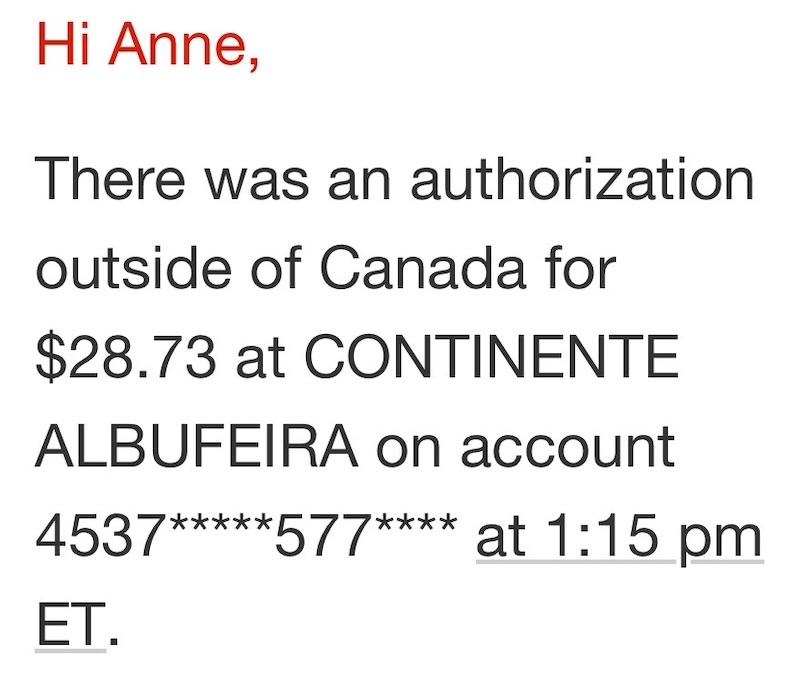
A critical feature of an expense-sharing app is the ability to quickly add the exact amount charged to the payer’s credit card. Therefore, we each set up a system with the financial institution to receive a notification for each charge, converted to the home currency. With each transaction, the notification is displayed immediately on the home screen and sent by email. This allows for each new expense to be added to the cost-sharing app while exiting the store.
3. Simplicity is key
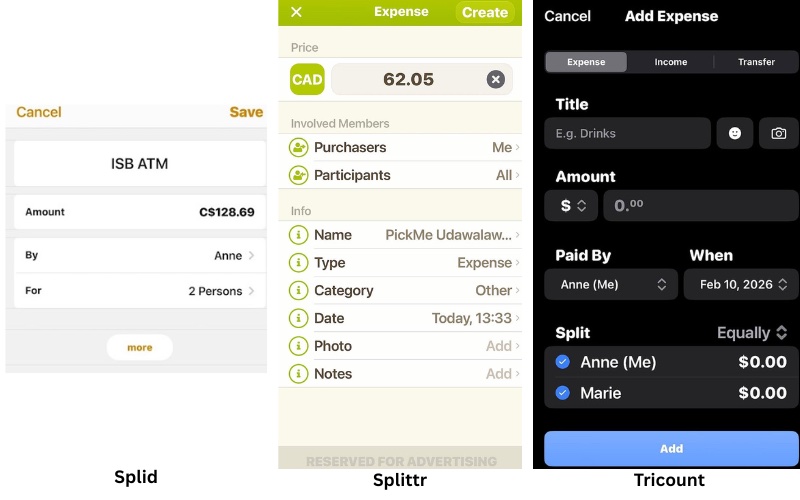
The faster a charge can be added, the less likely it will be overlooked. Adding a charge as soon as possible after payment is a priority. We don’t need icons, dates, times, notes, photos of receipts, or any distractions from adding the cost, what it was for, who paid, and who needs to split (or not split) the expense.
The ability to export a file and request the settlement of accounts can be managed from within the app.
My choice in an expense sharing app: Splid
The jury’s out. I love the simplicity of Splittr. However, Splid is my current choice, so I paid the Splid Plus fee of $4.99 to access the extra features. However, I’ve been a loyal Splittr user for many years after switching from Splitwise. At the time, I found Splittr more user-friendly than Spitwise, and it was free to access the features I needed. I might pay $14.99 to remove ads and gain access to enhanced features.
While there’s a lot to like about Tricount, the screen is cluttered and takes up more screen space than Splittr or Splid for recording and reviewing expenses.
With the tagline, “Split bills, not friendships,” Splid is a straightforward, no-frills cost-sharing app for group travel. It’s ideal for group members wanting an uncomplicated app for splitting group expenses.
Splid works offline, so it’s perfect for those without a cellular/mobile connection or access to reliable Wi-Fi. Other key features for people on the move include handling complex splits, access to 150+ currencies with automatic conversion, and exporting summaries for hassle-free settlement of shared costs.
It requires no registration; a group can be created without sending an invitation to group members. This feature is useful if one or more members of a group aren’t tech-savvy or don’t travel with a phone. Also, not all members need to pay a fee to remove advertisements or add enhanced features.
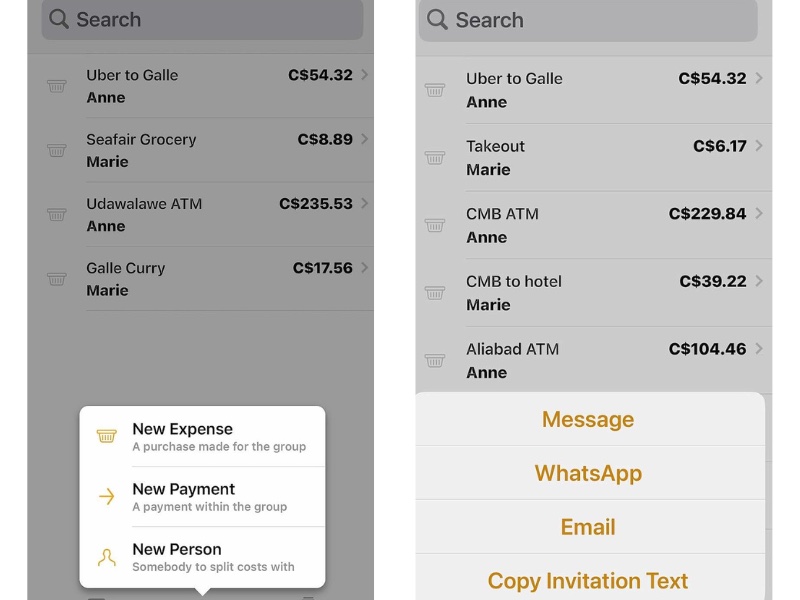
For cost-sharing groups that allow periodic payments during the trip, Splid can add a “New Payment” (vs. a “New Expense”).
At the end of a trip or at agreed-upon intervals, a PDF summary can be sent to group members via text, email, or WhatsApp.
Conclusion
Cost-sharing apps streamline and simplify recording shared expenses and calculating who owes what to whom, allowing group members to settle up quickly without complicated procedures. A cost-sharing app offers transparency and fairness, removes awkwardness, and helps maintain financial harmony while travelling with others.
Might you be interested in a couple of related posts? Wealthsimple is a Canadian product profiled in my Review of the Wealthsimple Prepaid Mastercard for Travel. The Scotiabank Passport Visa Infinite Credit Card is a no-FX-fee card which earns Scene+ points. For more information, see How to use Scene+ points to reduce travel costs.
Do you have a favourite expense-sharing app? If so, which one? Why? Please add your thoughts in the comments. Also, if you found this article helpful, please share it by selecting one or more social media buttons. Thank you.
Care to pin it for later?





Wow. I never even knew these tools existed. Very useful for large groups sharing costs.